Tack Retail Buying · 28 October 2026 · 12 minute read
How to Check a Horse Tack Product Data Specification
A sales and purchasing perspective on product information for retail assortments.
A product data specification should let your shop answer a simple question: what exactly will the customer receive? A familiar product name is not enough when colours, pack quantities and size descriptions differ. Start with the supplier’s identified information, connect it to the variant you intend to sell, and retain the evidence behind important claims. The result should help a shop assistant and an online customer understand the same item without decoding a purchasing conversation.
1. Start the product data specification with its source
Record where each important fact came from before rewriting it for the customer. A current model sheet, a written answer about supplied contents and a product photograph answer different questions. Keep their dates and references with the record rather than pasting everything into one description. If two sources disagree, identify the disputed field and ask the supplier which statement applies to the chosen model. A newer file name alone does not settle the disagreement.
Separate the supplier’s product reference from your shop’s retail identity. The supplier model connects your enquiry to the item being discussed; your own stock reference connects receiving, sales and stock review. Record both when you use both. This is particularly useful when a shop-friendly title is much shorter than the supplier title. A customer may see “green grooming brush”, while the buying team still needs the model and agreed colour designation behind it.
- Product identity: retain the supplier model, your retail reference and the exact variant being discussed.
- Evidence: record the document or written answer, its date and the field it supports.
- Decision: distinguish information accepted for use from a question still awaiting an answer.
- Responsibility: name the person who will resolve the question and maintain the current record.
Give the retail record a clear scope. Product facts describe the item, while current stock and purchasing terms concern a particular time or enquiry. A quotation may confirm a proposed colour allocation without proving that every colour in a catalogue is ready to ship. Keep that commercial answer alongside the relevant order discussion. Avoid turning an old answer about one allocation into a permanent statement on every retail listing.
Use the silicone tack assortment for retail shops to choose the models you actually want to describe. A smaller, clearly identified selection is easier to maintain than a broad collection of partly copied records. Add depth when you can distinguish the additional options and explain them to customers. The purpose is not to collect the largest number of fields, but to retain enough reliable information for the buying and selling decisions you make.
2. Map real variants, not every possible combination
A variant record should describe an actual combination offered for the selected product. Shopify’s product variant guidance explains variants as combinations of option values, such as size and colour. For your tack range, connect each offered combination to its own source information. A list of colours beside a list of sizes does not establish that every possible combination is offered, much less that every combination is currently in stock.
For the silicone grooming brush range, begin with the chosen brush model and the colours included in your buying discussion. Keep a retail colour name beside the supplier’s designation rather than replacing the original wording everywhere. This helps a buyer reconcile a later answer with the customer-facing title. If a photograph looks green but the written designation is ambiguous, resolve the naming question before treating the picture as a complete variant record.
- Identify the selected model before adding its option values.
- List only the combinations supported by the current supplier information.
- Connect each offered combination to the appropriate retail reference and image.
- Keep current order or stock information separate from the product’s descriptive identity.
Your catalogue should preserve the distinction between a product family and the individual lines your shop sells. A family description can explain what the range is for. The individual record still needs the option values that distinguish one purchase from another. Otherwise, staff may copy a general description onto a different colour or construction and unknowingly carry across an image or instruction that belongs elsewhere.
When preparing customer-facing options, check how they read together. The title, selected option and photograph should point to the same item. Review the default selection as well as the alternatives: a correct image attached to one option does not prove that the initial page presentation is clear. Your shop can manage these records through its chosen third-party retail platform or a simple controlled worksheet; the supplier discussion remains about the actual products and information required.
3. Make the selling unit unmistakable
The selling unit is the quantity and contents the customer receives for one retail purchase. Keep that definition separate from the quantity your shop orders and the outer quantity used for receiving. A pair, an individual piece and a set are not interchangeable descriptions. Confirm the supplied contents for the selected line, then use the same meaning in the title, staff notes and customer description. This prevents a tidy catalogue from concealing a basic quantity disagreement.
For silicone bit guards, ask whether the proposed line is supplied as an individual guard or a pair. Connect the answer to the specific quotation and product record. Do not let a photograph of guards beside a metal bit define the sale by itself. The product data specification should make clear which contents belong to the purchased unit and which visible objects merely explain where the guards are used.
On narrow screens, swipe horizontally to compare all columns. Keyboard users can focus this region and scroll across.
| Record element | Question it answers | Evidence to retain |
|---|---|---|
| Product and variant identity | Which model and option combination is this? | Current model reference and the offered combination. |
| Retail selling unit | What does one customer purchase contain? | Written contents and piece, pair or set definition. |
| Buying and receiving quantity | How does the ordered quantity relate to retail units? | Agreed order-unit relationship and receiving record. |
| Current sellable stock | What can the shop presently offer from its stock? | Shop inventory status, location and review time. |
Document the relationship between a buying unit and a selling unit before receiving stock. If the shop intends to split a larger quantity into smaller retail units, the receiving team needs an explicit conversion. They also need to know which description and contents follow the smaller unit. Treat that as a retail operating decision requiring a clear record, not as a conclusion drawn from the way several items happen to appear in a photograph.
Keep the quantity basis visible during stock review. Shopify’s inventory state definitions distinguish available, committed, unavailable and incoming quantities; incoming stock is not available before receipt. Other systems may use different labels, so check your own definitions. Product identity and selling-unit information should remain consistent while those quantities change. A complete descriptive record is useful evidence about the item, not evidence of present sellable stock.
4. Keep dimensions and compatibility tied to evidence
A useful size field identifies what was measured, which unit was used and which model the measurement describes. Length alone can be ambiguous when the record does not identify the measured feature. Ask for a labelled explanation where the customer’s choice depends on it. Preserve the supplier’s original value and unit alongside any shop presentation. If you convert a measurement, check the conversion and rounding rather than silently turning an approximate label into an exact dimension.
Separate size designation from physical measurement. A label such as medium can organise a range without defining the same dimensions across different products. Likewise, two products with similar names need not share construction or intended fit. In your source worksheet, connect the size designation to the selected model’s dimensions and supporting information. Avoid copying a neighbouring product’s size explanation because its page happens to contain a more complete description.
- Identify the measured feature and its unit, not only a number.
- Retain the model-specific source behind the dimension or size description.
- Describe the limits of any stated compatibility rather than claiming universal fit.
- Ask a named contact to resolve missing measurements before making a dependent selling claim.
Compatibility needs its own evidence. A guard photographed on one metal bit shows that presentation, not compatibility with every ring size or construction. Ask which dimensions and fitting conditions support the proposed description. For a saddle pad, identify the selected construction and size rather than treating a familiar size label as proof of suitability for every saddle. Where an individual horse’s fitting decision requires specialist judgement, keep that judgement distinct from the supplier’s dimensional information.
Write customer language that reflects the evidence you have. A clear, limited dimension can help someone compare an item without promising an outcome the measurement cannot establish. Where a fit question remains open, give staff a useful question to ask rather than a broad reassurance to repeat. Retain the response with the relevant field. This makes the record more helpful for a later enquiry than a general note saying that the product should probably fit.
5. Match images, intended use and care to the same item
Check the photograph against the variant record before attaching it to a listing. Look for the construction, colour and visible contents, then compare those details with the written information. Use descriptive image text that explains what is actually visible. Avoid loading an image description with material grades, performance claims or stock statements that the photograph cannot prove. A picture can help customers recognise an item, but it does not replace its written description.
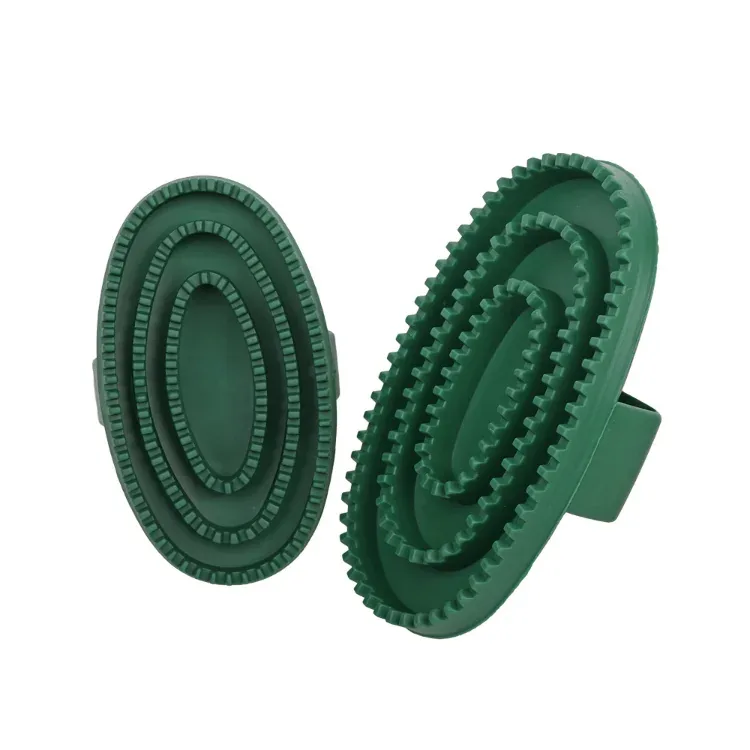
The green brush image illustrates why image assignment needs an owner. The picture can distinguish an appearance from another option, while the written record establishes the model and agreed colour wording. Keep those connections together when someone changes a title or replaces an image. If a different view would help explain the working surface, ask for an appropriate product view rather than describing a feature that the existing photograph does not clearly show.
Keep intended use practical and product-specific. A grooming brush description can explain grooming and cleaning tasks without turning them into a disease-prevention claim. A pad description should identify the selected product rather than promise a therapeutic result. When copying supplier wording, ask whether each statement applies to this model and whether the supporting information is adequate for the intended claim. A more impressive sentence is not necessarily a more useful buying fact.
Care information must also follow the complete item. Instructions suitable for one silicone component do not automatically apply to a product containing leather, textile, adhesive or metal parts. Ask for care directions for the selected construction and retain their source. Carry the relevant instructions into the shop’s customer information without adding a cleaning temperature from a different product. When a care answer changes, review the listing, staff guidance and any shop-created care note together.
6. Assign unknowns and carry changes into both channels
Make uncertainty actionable within the retail record. Separate an unanswered question from a field that genuinely does not apply, and distinguish both from a value that has been confirmed. Give each open question an owner and a next action. A simple worksheet can do this if the team uses it consistently. The useful discipline is preserving the meaning of the field, not buying more software before the product information is clear.
Decide what an unresolved field prevents you from saying or doing. An uncertain decorative colour name may need a naming decision, while an uncertain selling unit affects what the customer receives. Missing care information affects the instructions you can confidently provide. Prioritise the questions according to their consequences for the sale. Keep unrelated, confirmed facts usable while withholding the particular claim that depends on an unanswered question.
- Log the changed field, its former value, the new evidence and the affected variant.
- Name the person responsible for the product record and those responsible for each selling channel.
- Update the shelf label, online title, option details, image or care note affected by that field.
- Review the customer-facing result and retain the date and outcome of the check.
Trace a change all the way to the places customers use. A corrected selling unit may require a shelf ticket change as well as an online description change. A revised dimension may affect a staff comparison sheet and a size explanation. Keep the earlier record so colleagues can understand which statement an earlier sale used. Check actual labels and listings after the update; an edited master record alone does not establish that every destination now agrees.
Finally, use the same variant identity when you move from catalogue maintenance into stock review. The tack shop reorder point guide addresses the shop inputs needed for that next decision. Keep demand and stock history connected to the correct selling unit rather than combining distinct variants under a convenient family name. Bring unresolved product questions back to the supplier with the model, affected field and existing source attached, so the next answer can be applied precisely.